flash audio cookies – using Local Shared Object to save playhead location
DOWNLOAD the SRC
So you or the client want to add some flash audio to some or all pages in your site. What do you do if you don’t want the loop to start at the beginning each time the page containing the .swf loads? While a truly aurally seamless solution would likely require the use of frames or a pop-up window, I came up with this for a client who wanted flash audio to play while the user was navigating a PHP store.
Here is a simple audio .swf with a bit of dialogue from "A Few Good Men." Try it by refreshing the page (F5); If the audio is playing, it continues where it left off when the page was reloaded; If it was off, your preference is ‘remembered’ for the next 48 hours.
|
If you are unfamiliar with Shared Local Objects, you might want to take a gander at this
tutorial first.
SETTING UP THE .FLA
Essentially, your audio.swf should be a loop which continually checks the current position of the playing audio object and defines that spot with a variable which is saved and referred to on the user’s hard drive.
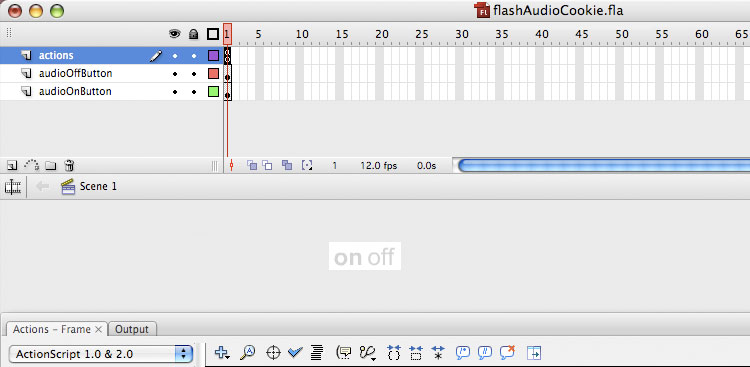
At left is your Flash Interface; The stage contains one ON Button, named "audioOnButton and one OFF Button, named "audioOffButton." In this case, each of these is a movieclip with "bold" and "normal" states which toggle depending on the audio status.
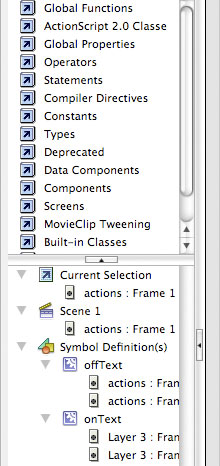
Ensure that the audio elements in your library have "Export for Actionscript" checked on in the Linkage Properties.
(When invoking a function which plays audio, just use one event with the on() handler. If you use more than one, such as on(press, release){} as I am fond of doing, your audio event will occur twice, resulting in a muddy echo.)
 |
 |
NUM
|
function init() {
bgTune = new Sound(this);
bgTune.attachSound("aFewGoodMen.wav");
audio_data = SharedObject.getLocal("myuser_data");
lastVisitDate = audio_data.data.visitDate;
storedAudioSetting = audio_data.data.audioChoice;
storedAudioPoint = audio_data.data.audioPoint;
if (lastVisitDate == undefined) {
lastVisitDate = 0;
}
if (storedAudioSetting == undefined) {
storedAudioSetting = true;
}
if (storedAudioPoint == undefined) {
storedAudioPoint = 0;
}
todaysDate = new Date();
timeLapsed = todaysDate.getTime()-lastVisitDate;
if (timeLapsed>172800000) {
storedAudioSetting = true;
storedAudioPoint = 0;
}
if (storedAudioSetting != false) {
bgTune.start(storedAudioPoint,999);
audioOnButton.gotoAndStop("bold");
audioOffButton.gotoAndStop("normal");
_root.audioOn = true;
} else {
audioOnButton.gotoAndStop("normal");
audioOffButton.gotoAndStop("bold");
_root.audioOn = false;
}
onEnterFrame = function () {
audioCheck();
};
}
function audioCheck() {
if (_root.audioOn == true) {
audio_data.data.audioPoint = bgTune.position/1000;
}
myDate = new Date();
audio_data.data.visitDate = myDate.getTime();
if (bgTune.position>=7700) {
stopAllSounds();
storedAudioPoint = 0;
audio_data.data.audioPoint = 0;
audio_data.data.audioChoice = true;
audio_data.flush();
init();
}
}
function turnAudioOn() {
if (_root.audioOn != true) {
_root.audioOn = true;
audio_data.data.audioChoice = true;
storedAudioPoint = audio_data.data.audioPoint;
if (storedAudioPoint == undefined) {
storedAudioPoint = 0;
}
audioOnButton.gotoAndStop("bold");
audioOffButton.gotoAndStop("normal");
bgTune.start(storedAudioPoint);
onEnterFrame = function () {
audioCheck();
};
}
}
function turnAudioOff() {
if (_root.audioOn == true) {
_root.audioOn = false;
audio_data.data.audioChoice = false;
audioOnButton.gotoAndStop("normal");
audioOffButton.gotoAndStop("bold");
stopAllSounds();
onEnterFrame = null;
}
}
audioOffButton.onRelease = function() {
turnAudioOff();
};
audioOnButton.onRelease = function() {
turnAudioOn();
};
init(); |
|
|
Posted 27. March 2013 by admin
Tags: audio, cookie, flash |
|